Key Takeaways
- Most charging port failures stem from blockages caused by compacted lint and dust.
- Intermittent charging and a loose cable fit often point to a dirty port.
- You can safely clean a port at home using a wooden toothpick and a soft anti-static brush.
- Physical damage requires professional repair. Examples include bent pins and water corrosion.
- Most charging port repairs at Cell Phone Hospital are completed the same day.
Your phone refuses to charge. It might take power for a few minutes before stopping completely, the cable may keep falling out, and you might even have to hold the cord at an awkward angle just to keep the battery symbol green. We know how stressful that situation is, especially since your device acts as your lifeline for work and navigation.
A broken port is rarely the true explanation; a large portion of charging problems are actually caused by dirt and compacted lint. People often assume the worst, but many of these issues can be resolved at home with the right tools. This guide walks you through how to tell the difference between a dirty port and a damaged one. We will explain how to safely clean it yourself, along with guidance on when you need to bring your device to the expert technicians at Cell Phone Hospital.
Common Signs Your Phone Charging Port Has a Problem
Understanding what your phone is telling you is the first step toward fixing it. The symptoms you experience when you plug in your device act as your primary diagnostic clues and can point in very different directions depending on what is actually going on inside the hardware.
Phone Charges Intermittently
Intermittent charging is one of the most frequent complaints we hear from customers. If the connection drops and reconnects randomly, this instability means the electrical contact between the cable and the port’s pins is weak. Debris is often the cause, but a damaged cable or a worn port can also create this exact symptom.
Charging Cable Feels Loose
A loose cable creates a distinct physical sensation that’s hard to miss. The charger slips out easily and the port no longer grips the metal connector with any firmness. Worth noting is that a loose cable fit differs completely from a port that shifts inside the phone housing; a loose cable is a fitment issue, whereas a moving port indicates structural failure.
Phone Only Charges at Certain Angles
Needing to prop the cable at a specific angle to get a charge is a classic symptom. Bent internal pins can cause this, as can compacted lint that pushes the connector out of alignment. It’s annoying, yet it provides a highly useful diagnostic clue.
Slow Charging or No Charging
Slow charging despite using a correct, high-quality adapter suggests something is interfering with the connection. Complete failure usually points to a more significant issue: The phone does not recognize the cable at all. This means you’re likely dealing with a dead port or a faulty accessory.
Signs the Charging Port is Just Dirty
Certain symptoms strongly indicate that a blockage is the problem. This is the most common scenario our technicians see, and you should always rule out dirt before assuming a component is broken.
Charger Connects but Disconnects Easily
Debris packed at the bottom of the port prevents the cable from seating fully. If the cable pops out with the slightest movement, the issue is a physical blockage stopping a flush fit.
Wiggling the Cable Pushes Past Blocked Pins
Adjusting the cable creates temporary contact by pushing past obstructed pins. The pins themselves remain intact; they are just buried under dirt. Applying light pressure against the blockage restores the connection.
You Can See Dust Inside the Port
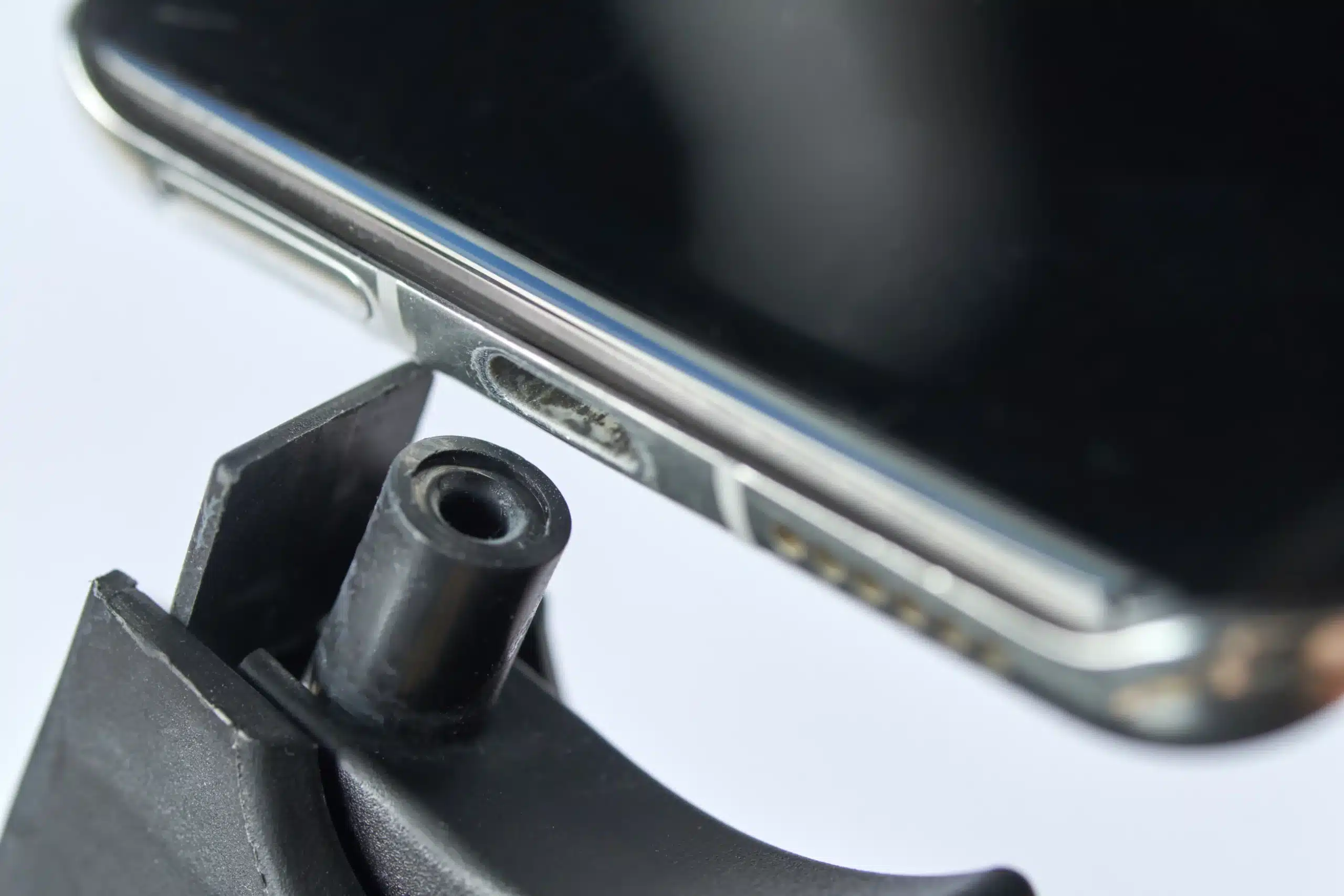
Grab a flashlight and look straight into the cavity. Compacted lint and dust typically appear as a dense plug sitting at the very bottom. If you can see the blockage, cleaning it out will likely solve the problem.
Device Still Detects Charger Occasionally
Inconsistent detection signals inconsistent electrical contact. The internal hardware and logic board connections are most likely still intact if the phone still sometimes recognizes the charger.
Port Looks Physically Intact
Inspect the port visually. Look for bent pins, green or discolored metal, or scorch marks. If the port passes this visual inspection, it probably just needs a careful cleaning.
Signs the Charging Port May Be Broken
Some symptoms go beyond what a cleaning can fix; these signs point to actual hardware failure. When you see them, it is time to visit the doctors at Cell Phone Hospital.
Bent or Missing Connector Pins
Forced insertion causes bent or missing pins. Using the wrong cable type also destroys these delicate contacts. Once those tiny metal pieces are deformed, they cannot make the electrical connection the cable needs, and no amount of cleaning will fix physical damage.
Burn Marks or Corrosion
Water damage and electrical shorting leave behind visible evidence. Green oxidation on the metal contacts indicates severe damage. Black scorch marks around the port also require professional component replacement.
Port Feels Loose or Detached Internally
The port itself might shift or wiggle when you insert a cable. This means the port has detached from the phone’s internal logic board. A structural failure of this magnitude requires immediate professional attention.
Phone Does Not Respond to Any Charger
Testing multiple known-working cables and adapters with zero response strongly suggests the port is dead. Complete unresponsiveness points to a failed component rather than a simple blockage.
Wireless Charging Works but Wired Charging Does Not
This test is one of the most reliable diagnostic tools available. A wireless charger may power up the battery without issue, but if the wired connection remains completely dead, the port hardware has failed. The battery and logic board are healthy; the port is the problem.
Common Causes of Charging Port Problems
Knowing how a port gets damaged or blocked in the first place helps you avoid repeating the same mistake.
Dust and Pocket Lint Buildup
The charging port acts like a small vacuum every time you slide your phone into a pocket. Lint and fabric particles get pushed in with each insertion of the charger, and this material compacts over time into a solid plug at the back of the port.
Moisture or Water Damage
Rain and high humidity threaten the delicate metal contacts inside the port. Sweat also creates problems as moisture creates the conditions for oxidation. This produces the green corrosion that degrades electrical contact and causes short circuits.
Frequent Plugging and Unplugging
Years of daily charging put real physical stress on the port, causing the internal retention clips to loosen over time. The solder connections that hold the port to the logic board can weaken as well, particularly on older devices.
Using Cheap or Damaged Chargers
Non-certified cables present a genuine risk. Poor fitment can physically deform the pins inside the port, and improper voltage delivery from a cheap adapter damages the internal circuitry.
Accidental Drops and Physical Impact
Dropping a phone while it’s plugged in causes severe damage. The leverage created by the cable during an impact bends the port and can even detach the component entirely from the motherboard.
How to Safely Clean Your Phone Charging Port
A careful DIY cleaning is worth attempting before heading to a repair shop, but be aware: The inside of that port is delicate. The wrong tool can turn a simple fix into a much bigger problem.
Tools You Can Use Safely
Stick to non-conductive, soft materials. A wooden toothpick works well for dislodging compacted debris, and a soft anti-static brush is ideal for sweeping away fine particles. Short bursts of compressed air clear loose dust without physical contact.
What to Avoid
Metal objects conduct electricity and scratch the contact pins, so you must never use paperclips or needles. Likewise, liquid cleaners and water should never go inside the port, and excessive force can cause permanent damage.
Step-by-Step Cleaning Process
- Power the phone off completely before you start. This eliminates any risk of a short circuit.
- Inspect the port with a flashlight to locate the debris.
- Gently trace the inside walls of the port with a wooden toothpick, scooping debris outward.
- Follow up with short bursts of compressed air to clear any loosened particles.
- Power the phone back on and test the charging connection.
When Cleaning Solves the Problem
A successful cleaning is immediately obvious. The cable seats fully with a satisfying click, stable charging resumes, and the need to hold the cable at an awkward angle disappears. You might pull out a surprising amount of compacted lint, but fear not, this happens all the time.
How to Test Whether the Port is Actually Broken
Work through this troubleshooting checklist before concluding the port is broken. Cables and adapters fail far more often than ports do, and ruling out those issues first saves you an unnecessary repair visit.
Try a Different Charging Cable
A new, high-quality cable is the first thing to test. Cables lead a hard life; they get bent and yanked out daily, and they break far more frequently than the ports they plug into.
Test Another Wall Adapter
A faulty power brick mimics a broken port. Swap in a different adapter before drawing any conclusions about the port itself.
Use Wireless Charging if Available
Place the device on a wireless charging pad. If the battery and logic board are healthy, it will charge normally, and you’ll know the problem is isolated to the physical port.
Check for Software or Battery Issues
A full restart clears temporary software glitches that interfere with charging. A degraded battery that drains faster than it charges can also look like a port problem. Battery health is worth checking in your phone’s settings.
Test Charging Through a Computer USB Port
Plugging into a computer USB port provides a useful secondary test. The port’s data pins are still functional if the phone draws a slow charge or shows up as a connected device for data transfer. This helps narrow down exactly what component is failing.
When You Should Visit a Repair Professional
DIY troubleshooting has limits. Professional diagnostics are the right next move once you’ve worked through all the steps above and the problem persists.
All Charging Has Failed After Testing and Cleaning
Persistent failure across multiple cables and adapters signals a hardware issue. A professional diagnostic will identify the specific fault when a thorough cleaning changes nothing.
Confirmed Water or Liquid Exposure
Known water exposure means the phone needs professional cleaning and component replacement right away. Waiting allows the corrosion to spread to the logic board, turning a manageable repair into a much more expensive one.
Failed DIY Cleaning and Testing
The issue is structural if cleaning did not resolve a loose or wobbly port. An internally detached port requires microsoldering and possibly even a full port module replacement. This work cannot be done safely at home without specialized tools.
Burnt Smell or Overheating
An overheating phone is a fire hazard, and a burning smell coming from the port area is equally concerning, as both point to excessive heat. Unplug the device immediately and bring it to a professional. Do not continue charging it.
Can a Broken Charging Port Be Repaired?
A damaged port rarely means you need a new phone. For the expert technicians at Cell Phone Hospital, it is a routine repair.
Cleaning vs. Repair vs. Replacement
Professional service covers a range of solutions, such as a deep cleaning using specialized tools to remove debris that DIY methods can’t reach. A microsoldering repair reconnects a port that has detached from the logic board. A full port module replacement swaps out the entire component with a new, high-quality part.
Average Repair Costs
Costs vary by device make and model, but charging port repair remains consistently budget-friendly. Third-party repair shops generally charge between $50 and $150 for most smartphones. This represents a fraction of the cost of a new device.
Repair Time Expectations
At the Cell Phone Hospital, speed matters. Most charging port repairs are completed the same day, so you’re not left without your phone for days while waiting on a mail-in service. Our technicians work quickly because we understand how much you depend on your device.
Risks of Ignoring Charging Port Issues
A finicky port creates ongoing problems. A poor connection generates excess heat during charging, which accelerates battery degradation. Left long enough, that heat stress causes logic board damage. A $75 port repair can turn into a far more expensive problem.
Tips to Prevent Charging Port Damage
Preventative maintenance goes a long way toward keeping your port in good shape.
Clean the Port Regularly
A light cleaning every few months prevents lint from compacting into a solid blockage. A quick burst of compressed air is usually enough to keep things clear.
Avoid Charging While Using the Phone Aggressively
Resting the phone on your chest while gaming puts real physical stress on the port. Bending the cable sharply while texting does the same. Set the phone down on a flat surface and let the cable hang naturally when charging.
Use Certified Charging Accessories
Non-certified chargers are responsible for a significant share of port damage cases. MFi-certified cables ensure proper fitment and safe power delivery for Apple devices, and High-quality USB-C cables for Android phones do the same.
Keep Phone Away From Moisture
Bathrooms during hot showers threaten your port. Outdoor environments in the rain and sweaty pockets pose similar risks. Steam and moisture seep in over time, and the corrosion they cause is slow but progressive.
Avoid Forcing the Charging Cable
Plug and unplug the cable gently, straight in and straight out. If you feel resistance, stop and check the port immediately. Forcing the connection bends the internal pins faster than almost anything else.
Conclusion
Many charging problems that seem serious turn out to be a simple matter of a dirty port. Gentle, proper cleaning resolves a large share of these issues without any professional intervention. Physical damage and structural failures are real, however, and they require the right tools and expertise to fix properly. The team at Cell Phone Hospital is ready to help if you’ve cleaned the port, tested your accessories, and the problem persists. We serve customers across Tulsa and Broken Arrow with fast, reliable repairs backed by our 90-day Satisfaction Guarantee Warranty. Bring your device in, and we’ll get you powered up and back to your life.
Frequently Asked Questions (FAQs)
A dirty port usually causes a loose cable fit or requires wiggling to charge, and you can often see lint inside with a flashlight. A damaged port may have bent pins, visible corrosion, or wiggle internally when you plug in a cable.
Yes. Compacted dust and pocket lint act as an insulator. This prevents the metal pins on the charging cable from making contact with the pins inside the port. Even a thin layer of debris disrupts the connection.
It is safe if you use the correct tools. A wooden toothpick or a soft brush is appropriate, whereas metal objects like needles or paperclips are not. They conduct electricity and permanently damage the pins.
This usually happens because debris is blocking a full connection, or internal pins have been bent or broken. Holding the cable at an angle forces temporary contact by compensating for the misalignment.
Signs include bent pins, green corrosion, and a port that shifts inside the phone when you insert a cable. A complete lack of response to any working charger is another strong indicator.
Yes. Expert technicians replace the charging port module or perform microsoldering repairs. Both options are far more cost-effective than buying a new device.
Costs vary by make and model. Most smartphone charging port repairs at third-party shops fall between $50 and $150. This provides a budget-friendly fix compared to the cost of a new phone.
Yes. Moisture from rain or high humidity causes the metal pins inside the port to corrode and oxidize. This degrades the electrical connection and leads to complete failure.
Compacted lint at the bottom of the port is the most common cause, as it prevents the cable from seating fully. Over time, wear and tear on the port’s internal retention clips produces a similar loose fit.
A light preventative cleaning every few months is enough for most people. You may want to check it more often using a flashlight if you carry your phone in a pocket or bag regularly.